
Getting Started
Learn how to navigate your dashboard, edit your listing, and manage your sharpening business on SharpFinders. A step by step guide for new listing owners.
Claiming Your Listing
If your business is already listed on SharpFinders, you can claim it for free. Claiming gives you ownership of the listing, a verified badge, and the ability to edit your information directly from your dashboard.
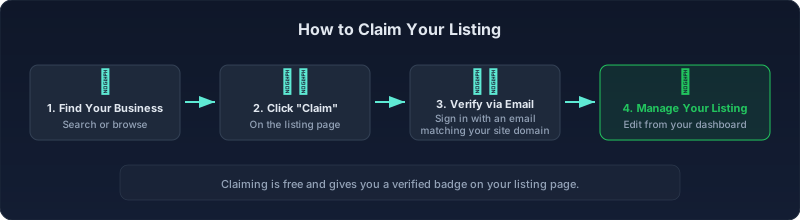
Start by searching for your business name on the homepage or browsing by city. On your listing page, click the Claim button near the top. To verify ownership, you will need to sign in with an email address that matches the domain of the website on the listing. For example, if your listing shows www.acmeblades.com, you need to use an email like you@acmeblades.com. This domain match is how we confirm you are the actual business owner. Once verified, the listing appears in your dashboard and you can begin editing it.
If your business is not listed yet, you can submit a new listing using the Submit page. New submissions go through a review before being published.
Your Dashboard
The dashboard is your home base for managing everything on SharpFinders. You can access it by clicking your profile icon in the top right corner of any page, or by navigating directly to /dashboard.
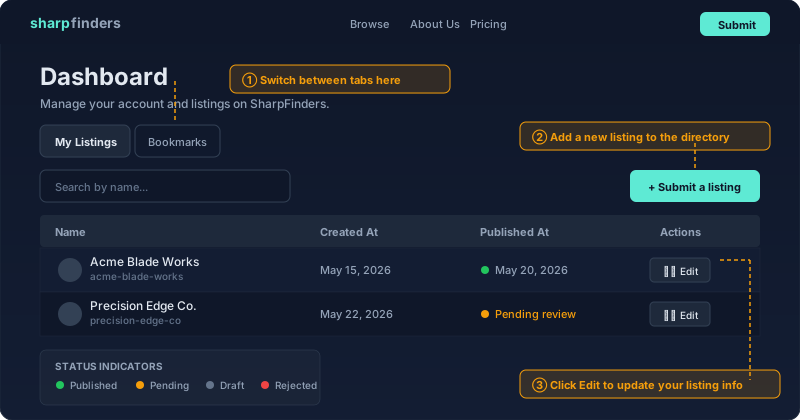
The dashboard has two tabs. My Listings shows every listing you own or have submitted. Bookmarks shows listings you have saved for reference. From the My Listings tab you can see each listing's name, creation date, publication status, and an Edit button to update the listing's details.
Status Indicators
Each listing in your dashboard shows a status that tells you where it is in the publication pipeline. Published means the listing is live and visible to visitors. Pending review means it has been submitted but is waiting for approval from our team. Draft means the listing has not been submitted yet. Scheduled means the listing is approved and will go live on a future date. Rejected means the submission did not meet our quality standards, and you can resubmit after making corrections.
Editing a Listing
Click the Edit button next to any listing you own in the dashboard. This opens the edit form where you can update your business details.
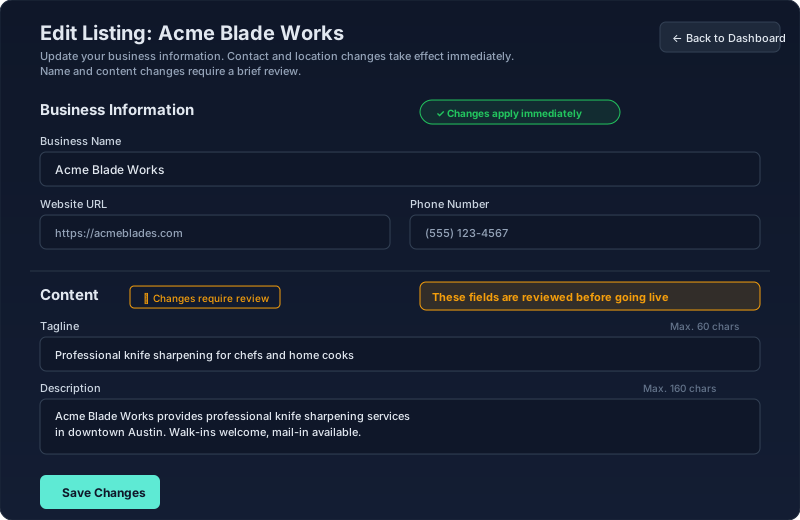
The edit form is divided into sections. The Business Information section covers your website URL, phone number, and affiliate URL. The Contact and Location section covers your street address, city, state, zip code, business hours, price range, and service types. The Content section covers your business name, tagline, description, and the longer "About" text that appears on your listing page. Local businesses also see a FAQs section where you can add questions and answers that appear on your listing.
What Happens When You Save
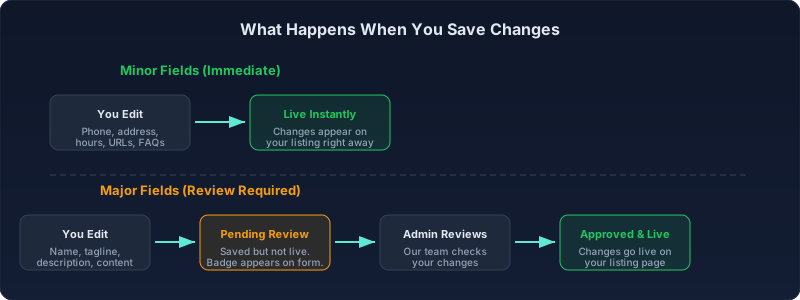
Not all changes are treated the same. SharpFinders uses a two tier system to keep listings accurate while giving you control over routine updates.
Immediate Changes
Updates to contact details, location, business hours, service types, price range, URLs, and FAQs take effect as soon as you click Save Changes. These fields are considered operational information that business owners need to update frequently, so there is no waiting period.
Changes That Require Review
Updates to your business name, tagline, description, and about content are held for review. When you save changes to these fields, you will see a confirmation message letting you know the changes have been submitted. A Pending review badge appears next to the affected fields on the edit form so you can see exactly which changes are waiting. Your current live listing remains unchanged until the review is complete.
Reviews are typically completed within one to two business days. Once approved, the changes go live automatically. If there is an issue with a submission, our team will reach out to you at the email address associated with your account.
Need Help?
If you run into any issues or have questions about managing your listing, reach out to us at info@contact.sharpfinders.com. You can also visit our FAQ page for answers to common questions, or read our How It Works page to learn more about how listings are verified and maintained.
 Your brand here: Reach customers actively searching for knife and tool sharpening services.